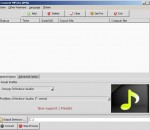
Free Convert MP3 to WMA Freeware is is the best software for Microsoft Windows Media Audio (WMA) file conversion of MPEG-1 Audio Layer 3 (MP3). It is very easy to use without any special setting, only a few clicks complete the task of video conversion. It is made for the beginner as well as having advanced functions for the professional user. It can detect your hardware configuration and decide an optimized conversion scheme automatically.
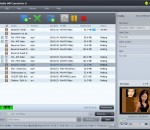
Convenient and powerful, 4Media Wii Converter 6 can convert AVI, MPEG, WMV, MOV, MP4, RM, RMVB, DivX, ASF, VOB and 3GP format videos to Wii-AVI and Wii-MOV videos. Besides, the most popular audio formats, like MP3, WMA, AAC, WAV, CDA, OGG, FLAC and APE can also be converted to MP3 and WAV formats which are compatible with Nintendo Wii.
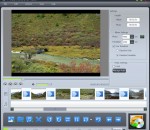
4Media Photo DVD Maker is just what you need if you want to quickly convert your entire photo library into DVD movies, burn them into DVDs, and enjoy them on large screens from your DVD players. You can also create ISO files and DVD folders for your photos, and create customized photo DVDs. Both multithreading and multi-core CPU processing are supported allowing for maximum photo to DVD speed of conversion.
WinX Free MOV to MP4 Converter is a free video converter which is designed to convert video from MOV to MP4 format for playback QuickTime MOV video files on MP4 compatible players or devices. And, this free MOV to MP4 video converting application enables you to transfer MOV to MP4 easily and fast. With this free MOV to MP4 video converter, you can easily take pictures from MOV movie and save them as PNG formats.
Free Convert M4A To MP3 is a free advanced tool that allows you to easily convert M4A or AAC audio files to MP3 and also to convert M4A or AAC to FLAC to AIFF,M4A to WMA,M4A to WAV,M4A to WavPack,M4A to OGG,AC3, AMR,MP2 and AU.Simply add the M4A or AAC files to convert,select the target audio format and quality profile and then press Convert button.Supports drag and drop,edit output profile,pause conversion,auto-shutdown.Multilingual.Easy to use.
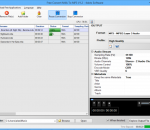
Want to play downloaded video or audio files on another device? Or convert videos, films, music to formats that work with you favorite device? Our tool is for you, the Reincubate Video Converter works on Windows (XP, Vista, 7, 8), with MP3 , OGG, M4A, WAV, AVI, WMA, AMR, MMF, FLV, MPG, MP4, 3GP, WMV, VCD, SCVD, DVD, MOV, H.264, Blu-ray, MKV, VOB, RM, SWF, MIM, CAF and Fraps video capture files.
Angel iPod Video Converter is the choice for iPod video and audio conversion program. It supports most of video formats including H264(MPEG-4 AVC),AVI,MP4 and audio file formats like MP3,AAC,M4A and more.
iCoolsoft MPEG-4 Video Converter is designed to help you convert almost all video/audio files to popular HD videos, AVI, MP4, MOV, 3GP videos or special MP4 videos optimized for various portable players. Almost all files are supported as the input, including HD videos,common videos,and audio files.This powerful MPEG-4 converter enables you to convert all these files to HD videos, MPEG-4 files, and diverse digital devices.
AVStoDVD is a flexible tool to convert various media formats to DVD compliant streams and burn them into a highly compatible multiple tracks DVD.
iCoolsoft Media Converter Pack is a comprehensive program which consists of DVD Ripper and Total Video Converter. It can help you convert DVD movies and general videos to other popular video formats like MP4, MOV, AVI, FLV, M4V, etc. You are allowed to edit the output videos with wonderful editing functions. These converted videos are able to play on your portable devices. And you can convert your files in batch.
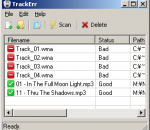
Quickly find malformed, i.e. DRM, audio tracks in your collection.
جوم ميديا بلاير مشغل الوسائط فقط تحتاج--مجاناً! ليس فقط GOM Media Player مشغل فيديو خالية تماما، مع دعم مضمن لجميع الفيديو الأكثر شعبية وتنسيقات Media Player، طن من الميزات المتقدمة، التفصيل الشديد، وخدمة "مكتشف الترميز", GOM Media Player التأكد من تلبية جميع احتياجات التشغيل الخاص بك. مع ملايين مستخدمين في مئات بلدان، GOM Media Player أحد مشغلات الفيديو الأكثر شعبية في العالم. ماذا يكون جديد: أضيفت "إعداد اتصال" ميزة لأجهزة الشاشات التي تعمل باللمس. وأضاف ميزة "مربع البحث" في قائمة التشغيل. (Ctrl + F) وأيد "عنوان HTTPS" يوتيوب أو تشغيل راديو صافي. (Ctrl + U) وأضاف "الاستفادة من الموسيقى" على التفضيلات المتعلقة بإمكانية تشغيل ملفات الموسيقى. تحسن الأداء ذات الصلة إلى "سرعة إضافة & حذف" الملفات في قائمة التشغيل. تصحيحات متفرقات، وإصلاحات أخرى والتغييرات
ريل بلير مكن دائماً لك للعب و RealAudio (*.ra) ولفظت (*.ram) الملفات. تحميل الفيديو من آلاف المواقع على شبكة الإنترنت مع واحد فقط انقر فوق إنشاء مكتبة الفيديو وقوائم التشغيل الخاصة بك تشغيل جميع الصوت الرئيسية وتنسيقات الفيديو دعم "فلاش فيديو" دي في دي، SVCD، VCD حرق والفيديو تسجيل ريل للاستخدام الشخصي ويشمل الصوت مؤتمر نزع السلاح حرق قدرات، DVR-نمط تشغيل البحث التخزين المؤقت، والوسائط المتعددة، ومحطات إذاعية عبر الإنترنت، مكتبة ملف الموسيقى على غرار، مستعرض ويب مضمن (باستخدام Microsoft Internet Explorer)، والقدرة على نقل وسائل الإعلام لعدد من الأجهزة المحمولة، بما في ذلك شركة أبل أي بود ومشغلات MP3، وأجهزة Windows Media.
جوم مشغل وسائط حرة مع أغنية شعبية آند المدمج في برامج ترميز الفيديو. مشغل جوم مكتشف الترميز يتضمن العديد من برامج الترميز (كسفيد، الأفلام، FLV1، AC3، OGG، MP4، H263 وأكثر) حتى أنك لن تحتاج إلى تثبيت برامج الترميز منفصلة لمعظم أشرطة الفيديو. جوم بلاير لملفات الفيديو التي تتطلب برنامج ترميز منفصلة، سوف تجد واحدة. اللعب براءة اختراع التكنولوجيا يتيح كسر أفي الملفات (براءة اختراع) "جوم بلاير" للمستخدمين بعرض ملفات مع فهارس مكسورة أو التي لا يزال يتم تنزيل. قوية العنوان الفرعي الدعم جوم بلاير يدعم الصناعات الصغيرة والمتوسطة، ملفات SRT, RT, SUB (مع IDX) للترجمة. يمكنك حتى مزامنة الترجمة والفيديو إذا كان هناك أي عدم تطابق. ملاءمة التشغيل إذا قمت بتشغيل ملف فيديو ويوجد بالفعل ملف مع اسم مشابه في الدليل، سوف تضاف تلقائياً إلى قائمة التشغيل الخاصة بك. مشغل جوم قد شكل قائمة تشغيل مماثلة ك M3U، PLS، ASX. دعم "مختلف أنواع وسائل الإعلام طول" مع تنسيق وسائط مختلفة مثل أفي، ميلا في الغالون، MPEG و DAT، "جوم بلاير" أيضا يدعم دفق تنسيق Windows media (WMV, ASF, ASX). يمكنك أيضا مشاهدة أشرطة الفيديو جودة دي في دي مع 5.1 قناة الصوت الناتج.